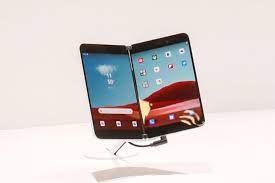
It all started one day while I was browsing the Amazon website. I noticed that the Surface Duo which was normally $1399 was cut down to $699. I figured it must have been an Amazon price cut but I went over to the Best Buy Website and looked and low and behold they were the same price there as they were on Amazon. My idea originally was to get it and use it as a tablet. These ads said these devices were unlocked and had wifi. I had no intentions of inactivating it and using it as a phone. I was selling a camera that same day so I used the money from the camera to pay for the device. I didn’t want to go deeper in debt buying it. I immediately went down to Best Buy and bought one. The model I got was the 128 GB Glacier White Surface Duo. I was the cheaper of the one and I ended up getting it for around $730 after taxes. I could have got it cheaper but like I mentioned above I had no intention to activate it and use it as a phone device.
As soon as I got home I ripped it open as in the normal fashion of all the electronics I get. I opened it and right away noticed and felt that it was constructed very well with top-notch materials. Microsoft seems to be very consistent in producing very good hardware for their Surface devices. Included in the box were a wall charger, a cable for the charger, and a bumper for the device. I noticed they have them for sale for $34.99 at Best Buy, but thankfully they put one in the box with the device. The bumper seems to be made of some rubber-type material that protected the device pretty well but kept on falling off and not staying on. When I first turned it on it took about 30 min to finish with the updates that were for the Android OS and the Microsoft Apps that are included with the Duo. It comes preinstalled with Android OS 10. Setting up the fingerprint login was very easy and took 5 mins to set up which is good compared to setting up the fingerprint on a windows machine. Some of the initial apps were pretty slow and unresponsive due to the 6 GB RAM that. Some of the apps that freeze on the Duo are Yahoo finance and MSN Money while apps like Twitter and Venmo run smooth. I’ve also downloaded a few more Social Media apps and they seem to work ok.
I also purchased the Slim Pen from Microsoft. I did my research and found that the Slim Pen was the best for the new Duo. I will go fully into a review for that at a later date. It works well with the Duo and is quick and easy to setup. I had to put the pen in its cradle for 1 min and then connect it to the Duo’s Bluetooth and BAM it was connected. I’ve found that when the battery in the stylus is low it seems to start lagging on the screen. You can drag the icons while using the Pen. That is so convenient when having to open multiple screens. NOTE(You don’t need to have the pen to operate the Duo, but makes things much easier.)Some of the Negative things I found out about the device is the lagging going between apps on both of the displays. Like I have mentioned before, it is a first generation device and there will be some defects in the hardware and software. Also the size of the device seems to be a little big to be carrying around in your pocket. Sure to be able to have a good experience on the device you need to have some size but it could of been a bit smaller. The availability of accessories was slim when buying at traditional electronic stores like Best Buy but taking a moment and looking on Amazon will get you a big choice on cases, stylus’s and tablet style holders. Some of the hardware quirks was the WiFi and Bluetooth strength. The WiFi was weak and barely got strong signal in the next room. Although that really didn’t effect speed of the browsing it was very noticeable. Paired with the Pixel Buds Series-A the sound was very good but the strength of the Bluetooth barely got me a signal from 15 feet away. The battery also drains pretty fast but I’ve heard there are fixes for that in upcoming software updates.
I initially bought it just for the tablet function and had no intention to pop a SIM card into the slot and use it as a phone. I did try and was pleasantly surprised by how good it worked. The call sound was very good and the SMS and MMS capability was equally as good. Like I mentioned before it was quite big to put it up to your ear and make a call, but it works good paired with a Bluetooth headset. It easily added all my contacts when it synced with Microsoft. This device really reminds me of the old Windows phones back 10-15 years ago. Its nice to have the capability of 2 screens so you could have 2 apps open at the same time. For example like a notes app and maybe a calendar app opened together will really boost productivity with the mobile worker. I never really had any dropped calls while using it and was pleasantly surprised with the performance as a phone device.
Some of my final thoughts of this device are as follows. The hardware and build of this device was very good to great. Like I mentioned before I’ve had all of the Microsoft Surface devices and this seems to be on par with the quality of the all the other previously built Surface devices. Being a first generation device its going to have it’s little defects I believe and the Surface Duo sure does. I listed some of those defects in the above paragraphs. One of those defects is the fact that when not using a stylus you have to put a considerable amount of pressure on the screen to scroll up or tap and icon with your finger. This device came with 6 GB of RAM and I think that a lot of the problems with the lagginess will be cured by adding 2 GB of RAM making it a total of 8 GB. So do I recommend it? Sure it’s a good device but it has it’s faults and hopefully they will be worked out before they roll out a second one.
Thanks for reading!!
Joe
 AverageGuySpeaks